How do I configure the eSATA combination on the A-520
Storage & PCIe Expansion · Updated 2026/08/20
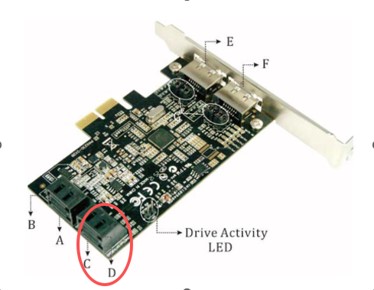
Q: How do I configure the eSATA combination on the A-520? Currently, only Port A is functioning properly. If I connect any device to the other ports, the entire card stops working.
A: Please check the jumper settings. Ports C and D are always active. By adjusting the jumper settings, you can enable Ports A, B, E, and F according to the reference table.
If you only have two hard drives, please connect them to Ports C and D.
Driver Download
- Download and install the driver.
- Connect the hard disks to Ports C and D, then verify whether the card functions properly.
- If the card operates correctly, it indicates that there are no compatibility issues between the card and the motherboard.